OpenPorte 1.29.0 is out on GitHub and WordPress.org. It resolves a weakness inherited from ALTCHA v1: a solved proof-of-work challenge could be reused without limit.
Verification itself was never broken. The gap was that nothing counted how often a token had already been consumed, so one solved challenge kept working until it expired. With Expiration set to “None”, that meant forever.
Each solved challenge is now accepted a limited number of times, counted server-side. The new Replay limit setting defaults to 5, with options for unlimited (old behaviour), strict single use, 10, or a custom value. Five rather than one because a form can bounce back due to legit reasons – a missing field, a mistyped password – and the visitor would resubmit the same challenge. A non-strict default keeps those humans in. Custom API Mode is covered too, with no change needed on your backend.
It never locks visitors out, OpenPorte follows here again a fail-open strategy. If the counter cannot be stored, submissions are accepted as before and the settings page tells you so.
This is the first iteration of issue #99, not all of it. Very short expiration (which is an issue for old hardware) and 0 (was “None” before) are still selectable, for now. The settings page warns, but rejects nothing now.
Contact Form 7 forms with a manually placed widget (using a shortcode) are verified server-side even when the integration toggle is off. If for whatever reason you relied on the widget being just decorative, it is no longer possible and unsolved submissions will now fail.
Developers: call `verify()`, and do not use the public `verify_solution()` or `verify_server_signature()` methods. Both are now deprecated and will be made private in 2.0.
One more thing. OpenPorte was verified to work with the new WordPress 7.1, while still supporting older releases down to WordPress 5.6.
If you allowed automatic update from WordPress.org, you have nothing to do. OpenPorte keeps your settings and provides safe new defaults.
OpenPorte just crossed 100 active installations on WordPress.org, and has already four encouraging reviews left so far. For a one-person fork that’s about three months old, this is motivating.
It is exciting to feel this is being useful also to others. So, thank you to everyone who installed it, and to the four of you who took the time to leave a review.
The road since the fork
It’s been about three months, so here’s the short version of how we got here:
June 2026 — 1.27.0, the fork itself. Picked up from ALTCHA Spam Protection v1’s last open-source release, rebranded as OpenPorte and still open-source. Existing ALTCHA v1 settings migrate automatically, and backward compatibility was implemented. The point was that switching over should be transparent and easy.
1.27.1–1.27.3. Fixes requested by the WordPress.org review team, then a dedicated security-hardening release (timing-safe signature checks, stronger key generation, tighter input validation), no behaviour change, just a harder shell.
1.28.0, the big one. Removed the last remnants of the old paid-SaaS tier. OpenPorte is now free, full stop, nothing gated or premium. Among many things, retuned the difficulty presets for modern hardware, and gave the settings page more explanation and live health checks so misconfiguration gets caught before visitors notice. Plus four new translations.
1.28.1. Housekeeping and a new GitHub home.
Translations. from 1 to 14 languages today, including isiXhosa (one of the South-African languages), Ukrainian, with help from open-weight local LLMs.
Without local open-weight and frontier LLMs, this feat would not have been possible.
What’s cooking for 1.29.0
Still in testing, no ship date yet, but here’s a preview of the headline items: replay protection and compatibility with WordPress 7.1.
Right now, a solved challenge stays valid until it expires… and if you’d set Expiration to “None,” that meant forever! In practice that’s a gap: a bot only has to solve one proof-of-work once, then can replay that same solved token indefinitely. 1.29.0 closes it with a new Replay limit setting (presets from single-use to unlimited, default 5, a small allowance so a visitor whose form bounces back for an unrelated reason, a typo, a missing field, isn’t punished for resubmitting). It applies whether you’re running self-hosted or pointing at your own Custom API backend, and the settings page will report its status alongside the existing endpoint health check.
The current stable release of OpenPorte does seem to work nicely with the newly released WordPress 7.1. But we will do a full non-regression testing to make sure it is 100% compatible.
That’s the short version — there’s a more technical writeup coming once it ships. A big thank you to qodop.com who remind me about the unsolved replay protection issue. This was an interesting journey to fix that, one that I might talk about in a future post.
If you’re using OpenPorte
A review, any review genuinely helps. It can be a motivation to continue the effort, new ideas or new perspectives for the project. So they aren’t good or bad reviews, they maybe easy or difficult to hear, but they all help me and the project. It also increases OpenPorte visibility on WordPress.org. And if you hit something odd, open an issue on GitHub, that’s exactly how the fixes above got found.
Made with 💘 in the Ruhr area, Germany.
Credits: The draft of this post was developed in conversation with Claude Sonnet 5 (Anthropic). Any errors of judgement remain mine 😉.
If you’ve ever used ALTCHA Spam Protection on your WordPress site, I have some news: that plugin now lives on as OpenPorte.
What is OpenPorte?
OpenPorte is a free/libre, open-source anti-spam plugin for WordPress. It protects your comment forms, contact forms, login pages, and more from bots, without cookies, without tracking, and without sending your visitors’ data anywhere. Everything runs on your own site.
It’s built on the same friction-less, tick-a-box proof-of-work approach that made the original ALTCHA Spam Protection plugin popular: no distorted-letter puzzles, no picking out traffic lights, just a quick, invisible check that’s easy for humans and expensive for bots.
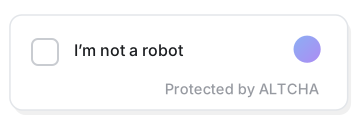
That’s the entire interaction1: one tick, a moment’s work in the background, done.
Why a fork?
ALTCHA Spam Protection (v1) was open-source software, free for anyone to use, inspect, and improve. Its original authors have since moved on to build a newer version, which is no longer fully open-source and puts some previously-free features behind a paywall, and they’ve retired the original v1 line.
I’d been a happy user of that original plugin for a while, so rather than lose it, I picked up the open-source project and kept it going under a new name, OpenPorte: a continuation of the v1 line, staying free/libre, open-source, and self-hosted, for anyone who wants to keep it that way.
If you are – or were – using ALTCHA v1, switching over is meant to be painless: install OpenPorte, and your existing settings come along automatically. Nothing you’ve already set up gets lost, and you can roll back if you ever want to. The only constraint is that you can’t run both plugins at the same time: it’s one or the other.
What’s new in the first releases (1.27.0 → 1.28.0)
The last open-source version of the ALTCHA plugin was 1.26.3. I picked up from there, and a few months in, here’s what’s landed:
⛓️💥 Fully free, no paid tier at all. The old paid add-on for spam classification has been removed. Every feature in OpenPorte is free and self-hosted.
A friendlier settings page. Clearer wording, helpful hints next to every option, and a show/hide toggle for the shared secret key field.
⚡️ Snappier verification. The small pause visitors used to see while the check ran has been cut from 1.5 seconds down to 0.5. That pause only ever changed how the check felt, it never made the plugin any better at stopping bots. What does help is the difficulty of the challenge itself, so there’s now a choice of algorithm, and the complexity levels have been retuned for modern hardware.
Several small but annoying bugs fixed, including a WooCommerce login/registration hiccup, a contact form that could show its widget twice, and a click that could get lost while a challenge was still verifying.
💬 New languages. OpenPorte now speaks 14 languages, including isiXhosa 🇿🇦, German 🇩🇪🇦🇹🇨🇭…, Ukrainian 🇺🇦, Czech 🇨🇿, Polish 🇵🇱, Romanian 🇷🇴, Turkish 🇹🇷 and Chinese 🇨🇳.
Extra security hardening, tightened under the hood. I believe in frictionless security, so there’s nothing you need to do. I also believe in transparency, so you can read the code, audit it, or report anything you find on the project’s GitHub.
A refreshed look, with a new logo and banner art.
One more thing, transparency
OpenPorte is a one-person project, and I’m opinionated about how it gets built: AI tools (Claude, Mistral, locally-run LLMs and others) help with drafting code, tests, translations, and documentation. The architecture, security decisions, and final review are mine. Without that help, keeping this fork alive wouldn’t be realistic for one person — so it felt right to just say so.
This post is a case in point: I keep notes from every working session, then asked the AI to pick out the parts that fitted what I wanted this post to be, and to help me draft it.
What’s next
This post is meant to be a friendly hello world. There’s a livelier, more technical follow-up coming later, with some of the more interesting (and occasionally eyebrow-raising) stories from behind the scenes of taking over an abandoned plugin. Stay tuned.
If you want to try OpenPorte, or peek at the code, it’s all on GitHub.
Made with 💘 in the Ruhr area, Germany.
The SVG animated image was created with AI and Inkscape. ↩︎
Credits: The draft of this post was developed in conversation with Claude Opus 4.8 (Anthropic). Any errors of judgement remain mine 😉.
While working on my WordPress plugin, I noticed that some plugins on wordpress.org display an additional “Community plugin” section in their developer sidebar, including a link to their source repository.
I initially assumed this was controlled by readme.txt, the plugin header, or some SVN convention. It turns out it is none of those.
Assisted by an AI Agent1, a little source-code archaeology revealed that WordPress.org uses an internal taxonomy plugin_business_model with terms including:
community
commercial
canonical
The taxonomy is registered by the Plugin Directory code and rendered by checking the assigned term.
The important detail for me turned out that this is not an author-controlled setting.
The taxonomy is available in the WordPress.org internal admin UI, but assigning it requires a special capability (plugin_set_category) that is only available to Plugin Team reviewers and administrators.
Once assigned, additional metadata becomes available (for example, a repository URL for Community plugins), but those fields only describe the classification; they do not create it.
Plugin authors cannot enable the “Community plugin” badge themselves. It is an editorial classification assigned manually by the WordPress.org Plugin Team.
Use of AI
An AI writing assistant was used to create this article. It mainly supported me summarising the long investigation that was conducted.
For this task I used Codex + ChatGPT Terra 5.6 and the all mighty grep. ↩︎