

If you’ve ever used ALTCHA Spam Protection on your WordPress site, I have some news: that plugin now lives on as OpenPorte.
What is OpenPorte?
OpenPorte is a free/libre, open-source anti-spam plugin for WordPress. It protects your comment forms, contact forms, login pages, and more from bots, without cookies, without tracking, and without sending your visitors’ data anywhere. Everything runs on your own site.
It’s built on the same friction-less, tick-a-box proof-of-work approach that made the original ALTCHA Spam Protection plugin popular: no distorted-letter puzzles, no picking out traffic lights, just a quick, invisible check that’s easy for humans and expensive for bots.
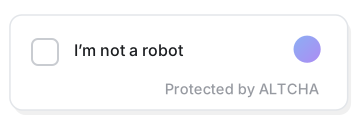
That’s the entire interaction1: one tick, a moment’s work in the background, done.
Why a fork?
ALTCHA Spam Protection (v1) was open-source software, free for anyone to use, inspect, and improve. Its original authors have since moved on to build a newer version, which is no longer fully open-source and puts some previously-free features behind a paywall, and they’ve retired the original v1 line.
I’d been a happy user of that original plugin for a while, so rather than lose it, I picked up the open-source project and kept it going under a new name, OpenPorte: a continuation of the v1 line, staying free/libre, open-source, and self-hosted, for anyone who wants to keep it that way.
If you are – or were – using ALTCHA v1, switching over is meant to be painless: install OpenPorte, and your existing settings come along automatically. Nothing you’ve already set up gets lost, and you can roll back if you ever want to. The only constraint is that you can’t run both plugins at the same time: it’s one or the other.
What’s new in the first releases (1.27.0 → 1.28.0)
The last open-source version of the ALTCHA plugin was 1.26.3. I picked up from there, and a few months in, here’s what’s landed:
- ⛓️💥 Fully free, no paid tier at all. The old paid add-on for spam classification has been removed. Every feature in OpenPorte is free and self-hosted.
- A friendlier settings page. Clearer wording, helpful hints next to every option, and a show/hide toggle for the shared secret key field.
- ⚡️ Snappier verification. The small pause visitors used to see while the check ran has been cut from 1.5 seconds down to 0.5. That pause only ever changed how the check felt, it never made the plugin any better at stopping bots. What does help is the difficulty of the challenge itself, so there’s now a choice of algorithm, and the complexity levels have been retuned for modern hardware.
- Several small but annoying bugs fixed, including a WooCommerce login/registration hiccup, a contact form that could show its widget twice, and a click that could get lost while a challenge was still verifying.
- 💬 New languages. OpenPorte now speaks 14 languages, including isiXhosa 🇿🇦, German 🇩🇪🇦🇹🇨🇭…, Ukrainian 🇺🇦, Czech 🇨🇿, Polish 🇵🇱, Romanian 🇷🇴, Turkish 🇹🇷 and Chinese 🇨🇳.
- Extra security hardening, tightened under the hood. I believe in frictionless security, so there’s nothing you need to do. I also believe in transparency, so you can read the code, audit it, or report anything you find on the project’s GitHub.
- A refreshed look, with a new logo and banner art.
One more thing, transparency
OpenPorte is a one-person project, and I’m opinionated about how it gets built: AI tools (Claude, Mistral, locally-run LLMs and others) help with drafting code, tests, translations, and documentation. The architecture, security decisions, and final review are mine. Without that help, keeping this fork alive wouldn’t be realistic for one person — so it felt right to just say so.
This post is a case in point: I keep notes from every working session, then asked the AI to pick out the parts that fitted what I wanted this post to be, and to help me draft it.
What’s next
This post is meant to be a friendly hello world. There’s a livelier, more technical follow-up coming later, with some of the more interesting (and occasionally eyebrow-raising) stories from behind the scenes of taking over an abandoned plugin. Stay tuned.
If you want to try OpenPorte, or peek at the code, it’s all on GitHub.
Made with 💘 in the Ruhr area, Germany.
- The SVG animated image was created with AI and Inkscape. ↩︎