
My Future Home Server – Part 2

I am experimenting with different OS to find the right settings for my Home Server. I was interested by Fedora especially because there are several “Red Hat” technology which I would like to use on my server, namely: oVirt and virt-manager. Furthermore it sports a recent Linux Kernel (3.7 as of this writing) which could be beneficial if I choose Btrfs for the underlying file system.

However, testing the upgrade path from Fedora 17 to Fedora 18, I am not so thrilled by the robustness of this OS. I have managed after painfully hitting 3 different blocking bugs to recover from the upgrade and have a nice Fedora 18 up and running. But this gave me little trust in the Q&A of the community. It seems that it is not the first time such problems happen (see Fedora 11).

I am still willing to give a go to Fedora. But out of precaution, I am going to experiment first with Ubuntu (for which I had since 2006 only once an upgrade problem). I want to see the state of oVirt and virt-manager on this OS before I am making any choice.

Or maybe I forget entirely about Linux based OS, and I go for FreeBSD with several jails instead of using virtualisation. Though I would need to check the state of technologies like ownCloud, (n)IDS, etc. on this OS.

My Future Home Server – Part 1

I have finally my Home Server built, it has its first storage hard drive and I upgraded the memory to something decent. Time to install the operating system.

I am not yet fully decided which operating system to implement on my Home Server, I would love ZFS as a file system for managing my storage, but I would still want to use Linux and not make the full switch to BSD. I decided to go for Fedora as the main OS, and install BSD in a virtual machine and see how this setup performs.

I had tried for a few month Fedora 17 in a virtual machine, I liked it, although I prefer the Debian package manager over yum, but this is really based on my own feelings and not on technical grounds.

So let’s go and install Fedora 18 (just released) on my server.

Continue reading “My Future Home Server – Part 1”

ZFS on Linux

In my previous post, I was stating that ZFS on Linux was not mature enough. The native ZFS port to Linux, although active, is still in release candidate stage and requires significant work to install. As for the ZFS FUSE version, it is still a 0.7 version not updated for long but it is easy to install on Ubuntu as it is available in the Software Centre (the link only works if your system supports the ‘apt:‘ scheme like on Ubuntu).

I have tried and installed the later, and although I cannot give any conclusion from a stability/reliability point of view, I was able to perform successfully the same steps I had performed on FreeBSD using ZFS.

Btrfs – Linux answer to ZFS

Sadly ZFS on Linux is not at the same maturity level than on FreeBSD (or even Solaris). There is a FUSE implementation but it is now more than 16 month since anything happen there, and in my opinion not yet stable. Regarding native ZFS port, only one ZFS implementation for Linux is still developed by the Lawrence Livermore National Laboratory but it is still a release candidate version.
The state of ZFS on Linux is perhaps not too good today, but there is another file system in development and good support that could soon compete with ZFS, its name is btrfs (pronounce ‘butter-fs‘). Btrfs is still experimental
Yesterday, one of my virtual machines running Oracle Linux 6.3 got its root file system full, as it was configured with LVM it was not so much trouble but I wanted to try btrfs. I decided to move the /var to another partitions using btrfs. I have created a new hard disk in my VM and started it. Here is the rest of the story.

Warning: following these instructions might break your system. As an advice, create a virtual machine and experience with it before doing so on a real system.

Continue reading “Btrfs – Linux answer to ZFS”

SSH goodies

Today I stumble upon an article regarding SSH on Oracle’s blogs.

One interesting feature I did not know is the SSH escape character ‘~’. So many times I had to open another terminal just to do one command locally before returning to the SSH session. Now this is over, just type ~^Z (a tilde followed by Ctrl-Z). Example

malmur :: ~ » uname -a
FreeBSD malmur 9.0-RELEASE-p3 FreeBSD 9.0-RELEASE-p3 #0: [...]
malmur :: ~ » ssh 192.168.78.10
unbreakable :: ~ » uname -a
Linux unbreakable.linux 2.6.39-200.29.1.el6uek.x86_64 #1 [...]
unbreakable :: ~ » ~^Z [suspend ssh]
[1]  + 2540 suspended  ssh 192.168.78.10
malmur :: ~ » fg
[1]  + 2540 continued  ssh 192.168.78.10
unbreakable :: ~ »

Ubuntu Server remote administration – Monit

Monit logoI have recently tested some remote administration tools for Ubuntu server (or any other Linux-based server). I have recorded here my findings and installation steps.

Today I present Monit, a monitoring and control tool for Unix and Unix-like systems.

This article will be followed by others with different tools. Stay tune, and you can find them all using the following tag remote-server-admin.

Continue reading “Ubuntu Server remote administration – Monit”

Home Server: The Concept

I’m currently looking for an elegant and easy to maintain solution for the following Home Server concept:

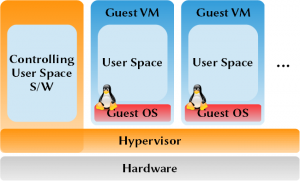
Running several VMs on top of an hypervisor.

As told, I have acquired a small server. I want to run on top 2 sets of services:

  • A back-up service;
  • A cloud synchronisation service (à la Dropbox).

I want to use virtualisation as I want each service in a dedicated sandbox. I’m not interested in containment style virtualisation because:

  • I probably will be adding new hardware nodes in some years as I will probably want to run other services;
  • I might be trying some of the *BSD OS, although I will be running Linux OS only.

Here are some technologies I want to investigate to see if some fit my needs: