
Category: Security

  • OpenPorte 1.30.0: closing the revolving porte

    OpenPorte 1.30.0 is out on GitHub and WordPress.org. This is a security release, so please update: it fixes two published security advisories, GHSA-vwx9-x8p5-xvmp and GHSA-8g7w-538v-w54x, both rated medium, plus three smaller hardening fixes.

    It all started with the release of Qwen3.8, an open-weight large language model, and I wanted to test its actual capabilities on my codebase. So I gave it a task to perform a security review of the code (at the time v1.29.1). It was able to detect minor security or robustness issues which Opus 4.8 missed when it reviewed the release v1.27.1. I decided to include them in our current release cycle which included some new features.

    And before shipping, I had the development branch reviewed again for security, this time with the help of two other AI code reviewers, Anthropic Claude Opus-5.5 and OpenAI Codex GPT-6-Astra. They found several ways a bot could skip the proof-of-work, or use less resources for it, on some forms and setups. Most of them were inherited from ALTCHA Spam Protection v1, some from its very first release. None of them exposed data, credentials or admin access, and passwords were always checked. What a bot could skip was the cost the proof-of-work provided by ALTCHA is there to add.

    The two security advisories

    AdvisorySeverityAffectedFixed in
    GHSA-vwx9-x8p5-xvmp: Solved CAPTCHA challenges accepted after their expiryMediumOpenPorte ≤ 1.29.1, ALTCHA Spam Protection ≤ 1.26.3OpenPorte 1.30.0
    GHSA-8g7w-538v-w54x: Login CAPTCHA checked only after the passwordMediumOpenPorte ≤ 1.29.1, ALTCHA Spam Protection ≤ 1.26.3OpenPorte 1.30.0
    • Expired challenges (GHSA-vwx9-x8p5-xvmp): a solved challenge could be altered so that its expiry was ignored, and reused long after it should have been refused. The Replay limit from 1.29.0 still capped the reuse, but expiry is meant to be the first line of defence. In Custom API Mode, a backend issuing challenges in an outdated format had the same problem (more on that below).
    • Login order (GHSA-8g7w-538v-w54x): on the login forms, the challenge was checked only after WordPress had compared the password. Guessing passwords cost nothing, and the error message even told a correct guess apart from a wrong one. Now the challenge comes first: without it, every attempt gets the same error.

    CVE IDs have been requested and will be added to the advisories when they are assigned.

    Still running ALTCHA Spam Protection 1.x? Both flaws are in it too, and it is no longer maintained, so there will be no fix there. OpenPorte imports your 1.x settings and keeps the free, self-hosted features backward compatible, the altcha shortcode included; only the paid altcha.org SaaS mode and its spam filter were not carried over. If you rely on those, the official ALTCHA plugin, now a new generation that is no longer GPL-licensed, offers them: see altcha.org.

    The other fixes

    On sites running WooCommerce, a forged form field could skip the WordPress login and password-reset checks. With the CoBlocks integration switched off, OpenPorte still overrode CoBlocks’ own reCAPTCHA (that one was discovered by Qwen3.8-27B). And in Custom API Mode, the site kept issuing challenges of its own, which let bots go around the backend’s rules. The full list is in issue #126.

    If you use Custom API Mode, open the OpenPorte settings page once after updating. The backend check now also warns when your backend issues challenges in an outdated format, the case behind CVE-2025-68113 and the second cause of GHSA-vwx9-x8p5-xvmp. Purge your page caches too.

    Release v1.30.0 not only contains fixes, but two new settings/features:

    • OpenPorte now supports an Ajax transport next to the existing REST API. A new setting allows for self-hosted mode switching the transport serving challenges through admin-ajax.php instead of the REST API. The intended use case is for sites whose security plugin blocks the REST API for visitors. OpenPorte still defaults to using the REST API transport, which we recommend using. Thanks to factor11 for the report and the workaround.
    • And “Keep settings when the plugin is deleted” lets you remove and reinstall OpenPorte without losing its configuration. It is off by default, so the plugin’s settings are removed when uninstalling it.

    Developers: the openporte_replay_limit filter now also receives the form the token was submitted on, so you can be stricter on replay limit for a login page than on comments. Existing callbacks keep working unchanged.

    If you allowed automatic updates from WordPress.org, you most likely already have 1.30.0. Your settings are kept.

    Known issue: LiteSpeed Cache

    Since the release, a user reported that they could not log in on a site running LiteSpeed Cache. With its default settings, LiteSpeed Cache stores REST API responses for seven days and ignores the “do not cache” headers OpenPorte sends. So every visitor gets the same challenge: logins and protected forms fail after five uses (the Replay limit) and for everyone once that challenge expires. This is not new in 1.30.0: it goes back to the first ALTCHA Spam Protection release, and the Replay limit added in 1.29.0 only makes it show sooner. The fix is ready and will ship in 1.30.1. Until then, if you use LiteSpeed Cache, pick one of these workarounds:

    1. In Settings → OpenPorte, set Self-hosted transport to Ajax, or
    2. in LiteSpeed Cache → Cache → Excludes → Do Not Cache URIs, add /wp-json/openporte/.

    Then run LiteSpeed Cache → Purge All once: the stale challenge stays cached until it is purged. Already locked out? Purge the cache from your hosting panel or with WP-CLI (wp litespeed-purge all); the next challenge is fresh, so you can log in and apply a workaround. Thanks to Nico for the report and the quick feedback.


  • Home network improvements – Setting up a Firewall

    Home network improvements – Setting up a Firewall

    This is the fourth blog post about my home network improvements series. I am sorry it is taking me so long to write all those posts, but each takes a lot of hours to write and I am balancing my life more towards family at the moment. I hope you can bear with me until the end.

    Great Wall winding over the mountains
    Walls need to adapt to their environment

    In the previous post, we presented installed the OS and set up networking and routing.

    We will now see how to add another very important feature the firewall.

    1. Router features list (published)
    2. Creating a basic router, defining the network and routing (published)
    3. Adding a firewall to our router (this post)
    4. Providing basic network services, DHCP and DNS (to be published)
    5. Testing the firewall (to be published)
    6. Extra services (to be published, could be splitted in more than one post)

    So today’s post will present a simple but secure firewall installation.

    As I have said in a previous article, I want to try out nftables instead of using iptables. But we will continue iterating on the previous post and use iptables instead one more time. I want to have a working router and then I can think of switching to nftables and solving integration with other tools.

    A Basic Firewall

    Firewall - Forbidden City Gateway
    Firewall

    We will use iptables command line to populate the firewall rules. As changing those rules from the command line is not persistent, a simple reboot will restore your OS in the previous configuration so if things do not workout or if we get locked out by a wrong rule, just reboot and restart to setup your firewall. Once we will be happy with the firewall, we will save the rule set and make it permanent.

    For rules, we obviously do not want any traffic coming from the WAN to establish new connections inside our LAN or on our router. Only established connections should be allowed through, e.g. an HTTP response is allowed through the firewall so that we can browse the internet. We want some network services to still function, like ICMP or DNS messages to pass through the firewall. We do not want to filter the outgoing traffic for the moment, so everything from the LAN is allowed to reach the WAN.

    I like to set default policies for the different iptables chains instead of relying on the last rule to do the policy for me. However, in order to avoid getting locked out, we will set those policies at the very end and always start by defining what is allowed. In order to define our firewall, we will work first with the main chains of the filter table (the default one). Mostly caring of incoming packets and IP forwarding rules.

    (more…)

  • Catch of the Day: Is it Good or is it Bad phishing?

    Catch of the Day: Is it Good or is it Bad phishing?

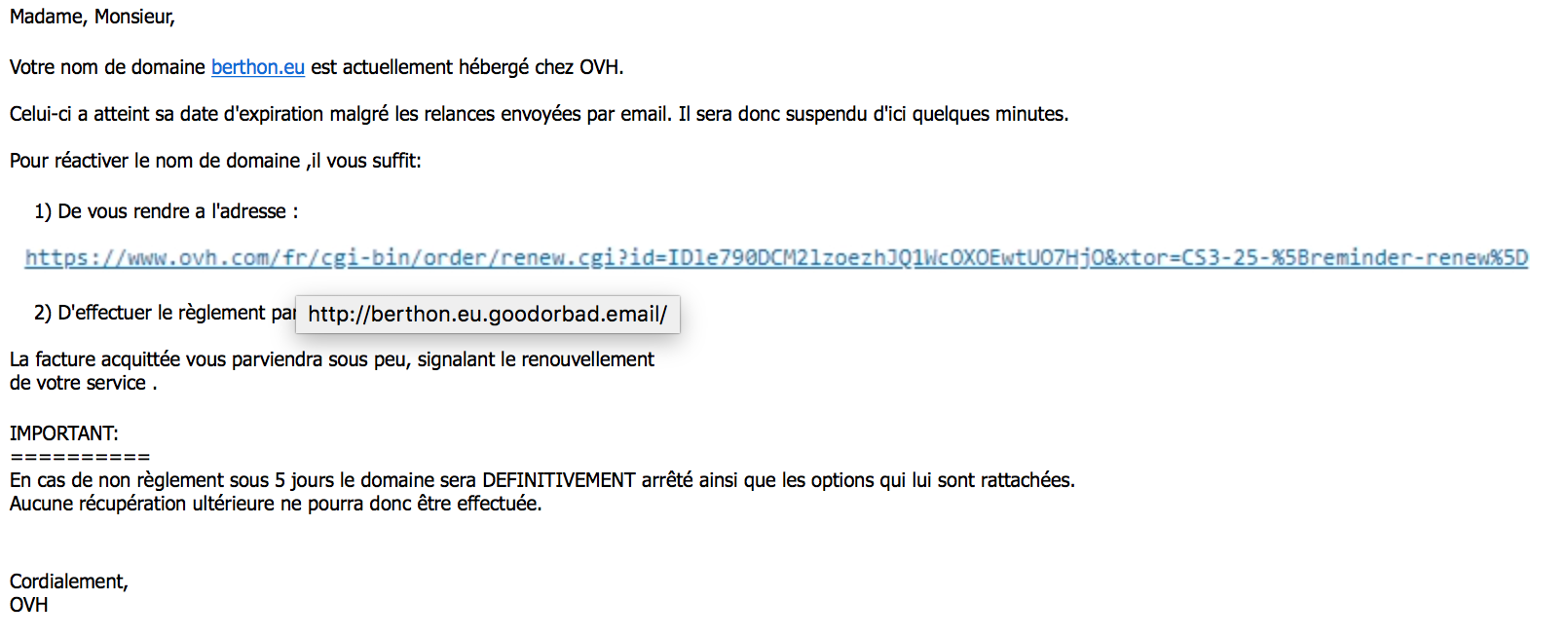
    I had a good laugh :D today at yet another phishing attempt.

    The phisher behind this campaign must be philosophers or fans of Shakespeare. The phishing domain name used is – no kidding – goodorbad.email!

    The link points to goodorbad.email domain name
    Phishing – Good or Bad?

    Bad luck also for our phisher, for once I was using Apple Mail on my wife’s laptop to check my daily email, and with a Retina screen the fake link was all blurry.

    This is interesting because it is the first time I see an attack trying to obfuscate the link using an image. Frankly I do not see the advantages, it has the risk of being blurry on hidpi or retina displays, it has the risk that it won’t be displayed if the image is remote (in that case, the image is provided as attachment so it was autoloaded).

    Anyway, the domain should have been probably goodorbad.phishing or simply bad.phishing!

  • An Unpredictable Raspberry Pi

    Critical Miss! by Scott Ogle, CC BY-SA 2.0
    Random Number Generator – Photo by Scott Ogle, CC BY-SA 2.0

    Our computers are not really good at providing random numbers because they are quite deterministic (unless you count these pesky random bugs that make working on a computer so “enjoyable”). So we created different ways to generate pseudo-random numbers of various qualities depending on the use. For cryptography, it is paramount to have excellent random numbers, or an attacker could predict our next move!

    Getting unpredictable is a difficult task, Linux tries to provide it by collecting environmental noise (e.g. disk seek time, mouse movement, etc.) in a first entropy pool which feeds a first Cryptographically Secure Pseudo-Random Number Generator (CSPRNG) which then output “sanitised” random numbers to different pools, one for each of the kernel output random device: /dev/random and /dev/urandom.

    Raspberry Pi Logo (a Raspberry)

    Our goal is to help our Raspberry Pi to have more entropy, so we will provide it with a new entropy collector based on its on-board hardware random number generator (HW RNG).

    I have already presented quickly why you need entropy (and good one), and also a quick way of having more source for the Linux kernel entropy pool for the Raspberry Pi using Raspbian “Wheezy” or for any computer having a TPM chip on board.

    This article is an update for all of you who upgraded their Raspbian to Jessie (Debian 8). The new system uses SystemD for the init process rather than Upstart for previous release.

    The Raspberry Pi has an integrated hardware random number generator (HW RNG) which Linux can use to feed its entropy pool. The implication of using such HW RNG is debatable and I will discuss it in a coming article. But here is how to activate it.

    It is still possible to load the kernel module using $ sudo modprobe bcm2708-rng. But I know recommend using the Raspberry Pi boot configuration, as it is more future proof: if there is a newer module for the BCM2709 in the Raspberry Pi 2 (or any newer model), using Raspberry Pi Device Tree (DT) overlays should always work. DT are a mean to set-up your Raspberry Pi for certain tasks by selecting automatically the right modules (or drivers) to load. It is possible to activate the HW RNG using this methods.
    Actually, we do not need to load any DT overlays, but only to set the random parameter to ‘on‘. You can achieve this by editing the file /boot/config.txt, find the line starting with ‘dtparam=(...)‘ or add a new one starting with it. The value of dtparam is a comma separated list of parameters and value (e.g random=on,audio=on), see part 3 of the Raspberry Pi documentation for further info. So at least, you should have:

    dtparam=random=on

    With this method, you have to reboot so that the bootloader can pick-up automatically the right module for you.

    Now install the rng-tools (the service should be automatically activated and started, default configuration is fine, but you can tweak/amend it in /etc/default/rng-tools), and set it to be enable at next boot:

    $ sudo apt-get install rng-tools
    $ sudo systemctl enable rng-tools

    After awhile you can check the level of entropy in your pool and some stats on the rng-tools service:

    $ echo $(cat /proc/sys/kernel/random/entropy_avail)/$(cat /proc/sys/kernel/random/poolsize)                                 
    1925/4096
    $ sudo pkill -USR1 rngd; sudo systemctl -n 15 status rng-tools
    rngd[7231]: stats: bits received from HRNG source: 100064
    rngd[7231]: stats: bits sent to kernel pool: 40512
    rngd[7231]: stats: entropy added to kernel pool: 40512
    rngd[7231]: stats: FIPS 140-2 successes: 5
    rngd[7231]: stats: FIPS 140-2 failures: 0
    rngd[7231]: stats: FIPS 140-2(2001-10-10) Monobit: 0
    rngd[7231]: stats: FIPS 140-2(2001-10-10) Poker: 0
    rngd[7231]: stats: FIPS 140-2(2001-10-10) Runs: 0
    rngd[7231]: stats: FIPS 140-2(2001-10-10) Long run: 0
    rngd[7231]: stats: FIPS 140-2(2001-10-10) Continuous run: 0
    rngd[7231]: stats: HRNG source speed: (min=824.382; avg=1022.108; max=1126.435)Kibits/s
    rngd[7231]: stats: FIPS tests speed: (min=6.459; avg=8.161; max=9.872)Mibits/s
    rngd[7231]: stats: Lowest ready-buffers level: 2
    rngd[7231]: stats: Entropy starvations: 0
    rngd[7231]: stats: Time spent starving for entropy: (min=0; avg=0.000; max=0)us

    Source:

    Raspberry Pi is a trademark of the Raspberry Pi Foundation.
  • App security is really low

    Web browsers have had since ages a small lock to tell their users when they were securely connected to a web server.

    Apps, especially those for mobiles, do not expose this information. It is very difficult to know if they use proper encryption, or that they even check the validity of the encryption certificates (when using methods such as SSL or TLS). Without such encryption, user credentials (login and password) and the exchanged personal data can easily be snooped.

    App makers should mandatorily use encryption for communication. And they should use certificates to make sure they connect to the expected server. And they should expose that to the user interface!

  • Mobile Security, Not Realy Usable, Not Really Secure

    Yesterday I stumble upon a journalist opinion who think that current Yahoo! CEO, Marissa Mayer, is just a twerp when it comes to mobile security. I do not think we should qualify someone, even the CEO of an internet company like Yahoo!, of a twerp just because one does not use a pass-lock for its mobile phone.

    Why mobile phone security is important?

    It is certainly about money, one could use your phone/data connection, but you can easily/quickly close this gap (e.g. using Apple’s Find my iPhone, or some Android equivalents). The other thing that has value is the personal data within the phone. But this has value either in the numbers (smart phone data from thousands of users stolen could interest spammers and hoaxers, for sure) – but unlikely with one phone theft – or because you are a high-profile person or you want to use those data against its rightful owner (blackmail, defamation, etc.).

    So yes, security is important for a mobile device.

    Security vs. usability

    But the usability and efficiency of the security features on mobile is awful! It gets into the way of quickly grabbing the phone and performing an action (urgent call, photo, etc.).

    Which is why I understand that people do not want to use a pass-code or similar mechanism to access their phone. Most are cumbersome, they get in the way of easily/readily use the phone (that’s why I still carry a camera when I want to take pictures!). And their relative security is dubious. The PIN1 or gesture authentication mechanism can sometimes – and with the right tool – be read from the finger traces on the phone and/or could be brute force (I am convinced there are ways to do that automated).

    Since a few weeks I have a smart phone. It is not a too old one, neither a brand new one, but it is a good smart phone. I got a Samsung Galaxy S (1st generation). I have tried several pass-lock, there is the ubiquitous 4 digits PIN, the swipe gesture, a password, a simple lock and nothing. Clearly, the two last options are the one usable! Out of the pseudo secure ones, only the PIN code seemed not too difficult to use. This is a great disappointment. I do not trust my phone to protect my data to the same extent I trust my computer. And the worst, it seems that making this better is not on the agenda of most manufacturers/mobile OS providers, unless you count the attempt by Apple to improve at least the usability side with the fingerprinting.

    Fingerprinting is not the panacea in terms of security. But when properly implemented it is as secured as a PIN-lock and it does not get in the way of using the phone2. Furthermore, I am sure this technology will evolved and we can hope in the near future to have good-enough fingerprinting-lock technology which can surpass PIN-lock in terms of security.


    1. I still do not get why PIN pass-code system do not randomise the place of the numbers on the screen!?!
    2. This is my humble opinion, no hard facts. Others have better expressed their views on fingerprinting on mobile phone than I did.